Description
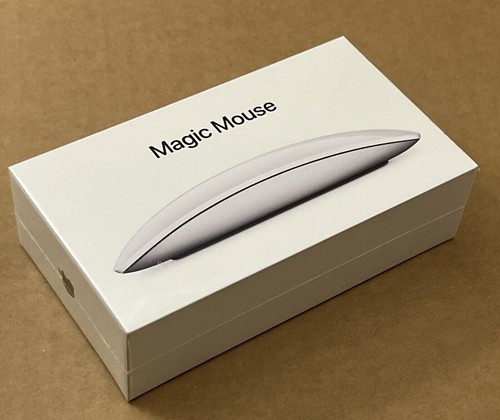
The Apple Magic Mouse (often colloquially referred to by consumers and retailers as the Magic Mouse 3, encompassing the 2021/2022 refresh featuring color options and the woven USB-C to Lightning cable) is Apple’s signature wireless, rechargeable mouse. Designed to complement the macOS ecosystem, it stands out due to its seamless glass top, low-profile symmetry, and full support for touch gestures.
A comprehensive breakdown of its design, features, performance, and specifications details what this peripheral offers:
1. Design and Build Quality
-
Aesthetic: The Magic Mouse features a minimalist, futuristic design with a continuous, seamless hard-plastic or glass-like top shell and an aluminum bottom base. It matches the sleek aesthetic of MacBooks, iMacs, and Mac Studios.
-
Profile: It is exceptionally thin and low-profile. Unlike ergonomic hump-backed mice, the Magic Mouse sits flat against the hand, encouraging a fingertip or claw grip rather than full palm resting.
-
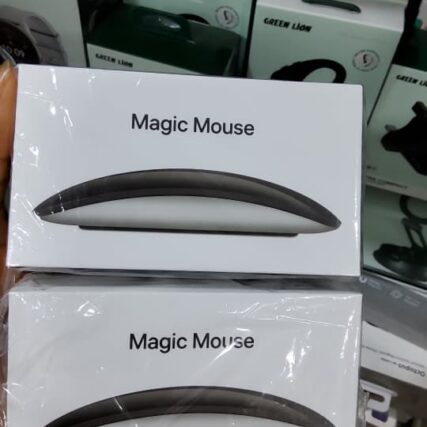
Color Variations: Alongside the classic Silver (with a white top), Apple introduced matching color variants (such as Black/Space Gray) originally bundled with matching iMacs or sold independently, featuring a dark-tinted top surface and a black aluminum underside.
-
Glide Feet: It features an optimized foot design that allows the chassis to glide smoothly and with minimal friction across wooden or desk-mat surfaces.
2. The Multi-Touch Surface
The defining feature of the Magic Mouse is that it has no physical mechanical buttons or scroll wheels.
-
Seamless Interaction: The entire top surface is a capacitive Multi-Touch plane.
-
Gesture Support: Borrowing trackpad technology, it recognizes intuitive gestures:
-
Scrolling: Swipe up, down, or sideways anywhere on the surface to scroll through documents, web pages, and timelines.
-
Secondary Click (Right-Click): Can be enabled in settings to register clicks on the right side of the mouse.
-
Smart Zoom: Double-tap with a single finger to zoom in on web pages or images.
-
Swipe between pages: Swipe left or right with two fingers to flip through web pages or full-screen apps.
-
Mission Control: Double-tap with two fingers to bring up Mission Control.
3. Connectivity and Pairing
-
Bluetooth: Utilizes reliable Bluetooth technology to connect wirelessly to host devices.
-
Instant Pairing: Offers a true plug-and-play experience. When turned on near a Mac, it pairs automatically with almost zero configuration required.
-
Ecosystem Compatibility: Native support is built directly into macOS. It can also connect to iPadOS devices (acting as a pointer), though gesture functionality is more limited outside of macOS. (Note: Basic functionality works on Windows via generic drivers, but multi-touch gestures will not work).
4. Power and Charging
-
Internal Battery: Houses a built-in rechargeable lithium-ion battery, eliminating the need for AA batteries found in the original 1st-generation model.
-
Battery Life: Highly efficient power management allows a single full charge to last one month or even longer depending on daily usage.
-
Charging Port Placement: The Lightning charging port is positioned on the underside (bottom) of the mouse. While this layout ensures the top remains completely clean and uninterrupted, it means the mouse cannot be used while plugged in and charging. However, a quick 2-to-3-minute charge typically yields enough power for several hours of emergency use.
-
In the Box: Ships with a color-matched woven USB-C to Lightning cable.
5. Pros and Cons
-
Pros:
-
Gorgeous, premium aesthetic that unifies a Mac workspace.
-
Fluid, smartphone-like momentum scrolling and gesture navigation.
-
Exceptional battery longevity per charge.
-
Lightweight and responsive for office tasks, media consumption, and creative timeline scrubbing.
-
Cons:
-
Flat ergonomics can cause hand fatigue or cramping during long, intensive work sessions.
-
Bottom-mounted charging port prevents wired passthrough usage while charging.
-
Not optimized or recommended for high-end gaming or 3D precision work due to lack of physical tactile buttons and low polling configurations.